
Table of Contents
You wrote what you thought was a great cold email. Send it to 500 people. Got two replies. Not because the copy was bad, but because most of those 500 people never saw it. The messages went to spam before reaching anyone’s inbox.
Cold email deliverability is the reason your outreach templates perform or don't. And most teams don't check it until reply rates have already dropped.
That is exactly what we are going to fix here. You will see 7 reasons your messages end up in spam and 5 fixes to start getting them back into primary inboxes.
What Is Cold Email Deliverability?
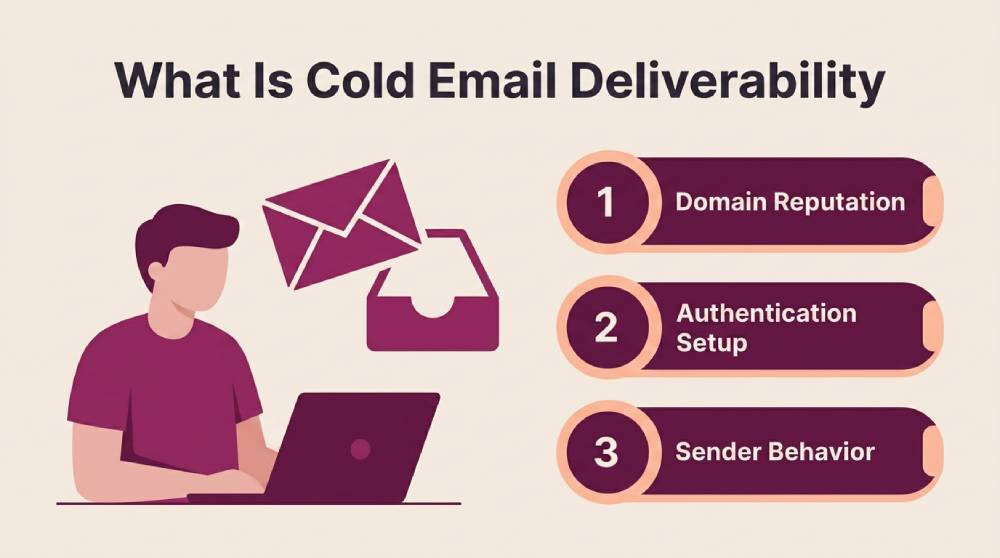
Cold email deliverability is whether your email actually reaches someone's primary inbox – not just whether their mail server accepted it. An email can be "delivered" in the technical sense (the server didn't bounce it) and still end up in spam where nobody ever reads it. Along the way, multiple systems like internet service providers and corporate mail gateways can influence how email is handled before it reaches the recipient.
But it comes down to two main factors: your sending domain's reputation and whether your authentication records are set up correctly. The way your emails are written plays a big role too. If you ignore any of those, your emails stay hidden no matter how good the subject line is.
Email Delivery vs. Email Deliverability: Understanding the Key Differences
These two terms measure completely different things. Teams see a 98% delivery rate and assume their emails are reaching recipients’ inboxes. They are not – they are reaching servers. That is a big difference, and it's one of the more common B2B outreach mistakes that quietly hurts campaign performance.
|
Factor |
Email Delivery |
Email Deliverability |
|
What it measures |
Whether the server accepted the email |
Whether the email reached the primary inbox |
|
What failure looks like |
Hard bounce – email rejected entirely |
Email accepted but routed to spam |
|
Typical benchmark |
95-99% for clean lists |
20-80% depending on setup |
|
What controls it |
Valid email address and working server |
Domain reputation and authentication setup |
|
Visibility |
Easy to track bounces are reported |
Hard to track – spam placement is invisible |
7 Reasons Your Cold Emails Land in Spam Instead of the Inbox
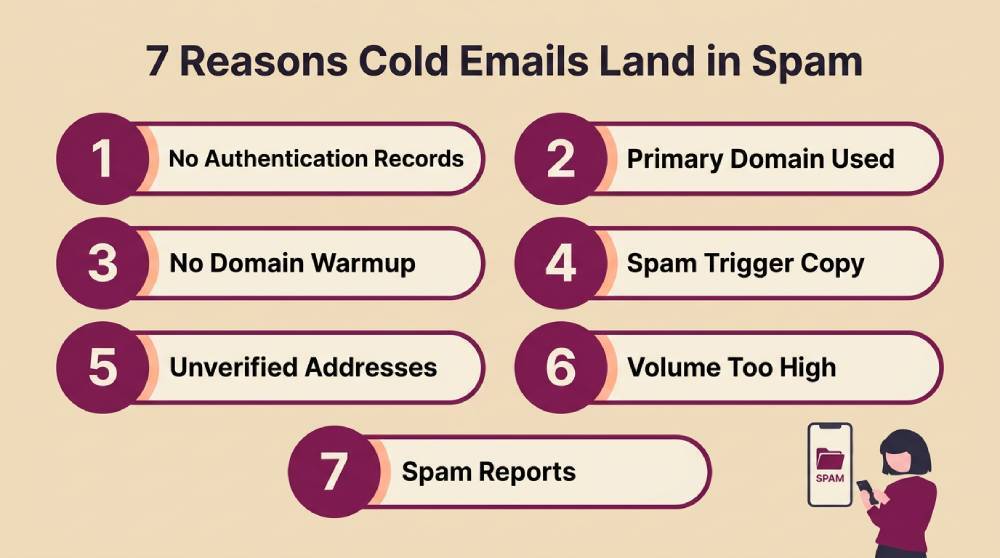
One small issue is sometimes all it takes to send your email somewhere nobody will see it. Here are the 7 biggest ones to watch for.
1. Your Sending Domain Has No Authentication Records
Gmail and Outlook both check for authentication records when your email arrives… SPF and DKIM specifically. They also look for a DMARC policy. If any of those are missing, the receiving server can't confirm your email actually came from who it claims to be. That is a fast track to the spam folder.
This is the most fixable cold email deliverability problem because it is purely a DNS setup issue. But it is also the most commonly skipped. Teams register a new sending domain and start running sequences without ever configuring the records that tell email servers the domain is real.
2. You Are Sending Cold Outreach From Your Primary Business Domain
When you send cold emails from yourcompany.com, and recipients mark them as spam, that reputation sticks to your primary domain. Your regular business emails – client invoices and partner replies – start going to spam too.
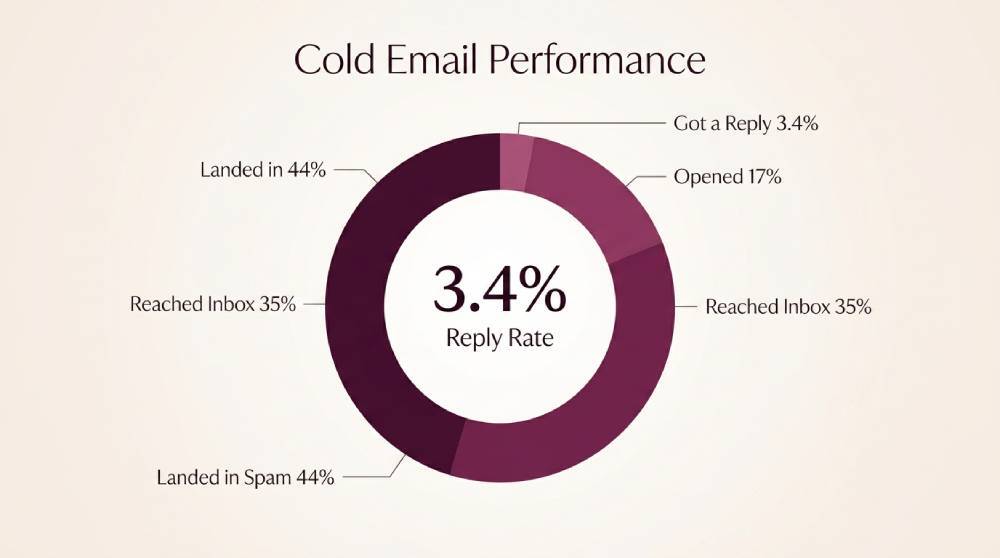
According to UnifyGTM's 2026 cold email analysis, the average cold email reply rate is just 3.43%. Email providers take that silence as a negative signal.
A separate domain like getcompany.com or trycompany.com keeps the cold outreach reputation isolated. If the outreach domain gets flagged, your primary domain stays clean. Avoid sending cold emails from the same domain you use for everyday business communication.
3. The Domain Wasn't Warmed Up Before You Started Sending at Volume
A brand new domain has zero sending history. No emails sent from it, ever. And for Gmail, that domain doesn't exist yet. So when it suddenly starts pushing out 200 emails in a single day, every spam filter in the chain flags it as suspicious. New domains need to build a reputation gradually – starting with a handful of emails per day and increasing slowly over 2-3 weeks.
The warmup process isn't just about sending volume. The emails sent during warmup need to generate real engagement… actual opens and actual replies. That is what tells Gmail this is a real person using a real domain, not a spammer spinning up a fresh domain to blast from. Skip the warm-up, and your inbox placement starts at rock bottom on day one.
4. Your Email Copy Triggers Content-Based Spam Filters
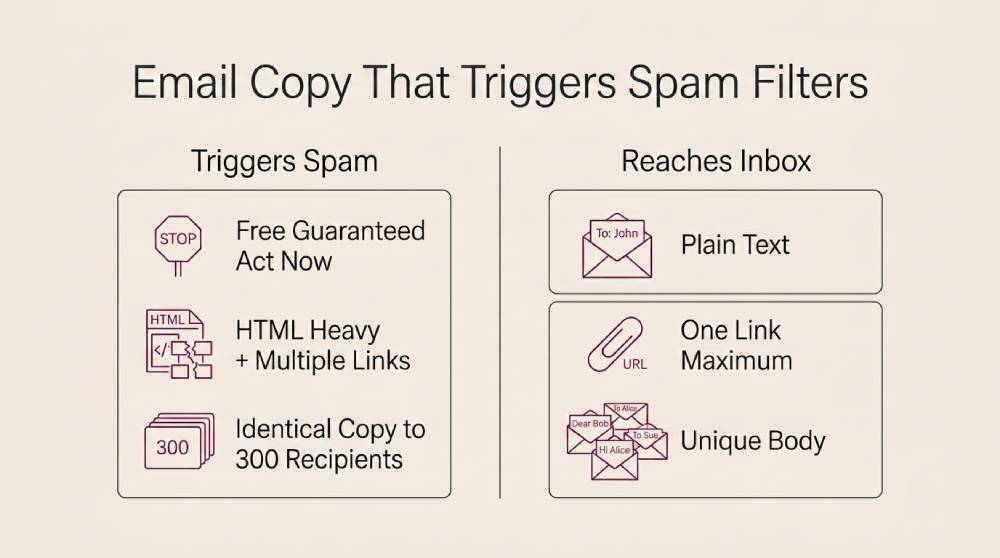
Spam filters don't just look at your domain reputation. They read your email. Spam trigger words like "free" and "guaranteed" raise your spam score immediately. So does HTML-heavy formatting with multiple tracking links embedded in the body. If your email looks like a marketing newsletter, Gmail treats it like one and routes it accordingly.
The other copy-level issue is sending identical text to hundreds of recipients. Even your best-performing email templates need regular updates to avoid looking repetitive over time. Gmail picks up on that pattern fast. If 300 people receive the exact same email within the same hour, that is bulk mail in Google's eyes, regardless of what the email actually says.
Personalizing the first line isn't enough either – you need variation in the body and the structure. According to MailReach's 2026 cold email guide, teams that follow proper sending discipline achieve 75% open rates on average across 130+ companies. But that number drops the moment copy starts looking templated.
5. You're Sending to Unverified or Stale Email Addresses
Every hard bounce hurts your sender reputation. And when you are sending to a list you bought six months ago that was never verified, you are going to get a lot of bounces.
Worse, some of those addresses are spam traps – old emails that providers deliberately keep active to catch people who send to unverified lists. Hit one of those, and your domain reputation takes a hit that's hard to recover from.
The age of your list matters big time. An email account that was valid 90 days ago might not be valid today. People leave companies. Roles get restructured. Domains get deactivated. If you are not verifying right before you send, you are taking a chance.
6. Too Many Emails Per Day From a Single Sending Address
There is a limit on the number of cold emails you can send from one inbox before providers start throttling you. In 2026, that ceiling was 30-50 emails per address per day. Push past it, and your emails start going to spam. Not because of the content, but because of the volume pattern. Gmail doesn't see a salesperson doing outreach. Gmail sees a machine pumping messages.
The fix isn't sending fewer emails total. It is spreading the volume across multiple email accounts. Five inboxes sending 40 emails each give you 200 daily sends without exceeding any single inbox's volume threshold.
But each of those inboxes needs its own warmup period and its own authentication records. This is one of the areas where responding to inbound leads has an advantage over cold – your primary inbox already has a reputation. Cold outreach domains start from zero every time.
7. Recipients Are Marking Your Emails as Spam
The signal goes directly to the email service provider when someone clicks the "report spam" button on your email. And it weighs heavily. Even a 0.3% complaint rate is enough to start dragging your domain reputation down. Google's own spam guidelines put the threshold at 0.1% for bulk senders.
The thing most teams get wrong is assuming bad copy causes spam reports. It doesn't, usually. Caution does. Recent research found that 63% of people have experienced some form of cyber abuse, which makes people far less willing to give unfamiliar emails the benefit of the doubt. If your message looks even slightly suspicious, many recipients will report it instead of opening it.
Irrelevant targeting plays a big role, too. If you are emailing a VP of Engineering about an HR tool, they are going to hit spam and move on. Targeting quality is one of the biggest factors in complaint rates, and most cold email deliverability problems that stem from spam reports trace back to list quality, not email quality.
How to Fix Your Cold Email Deliverability: 5 Proven Strategies
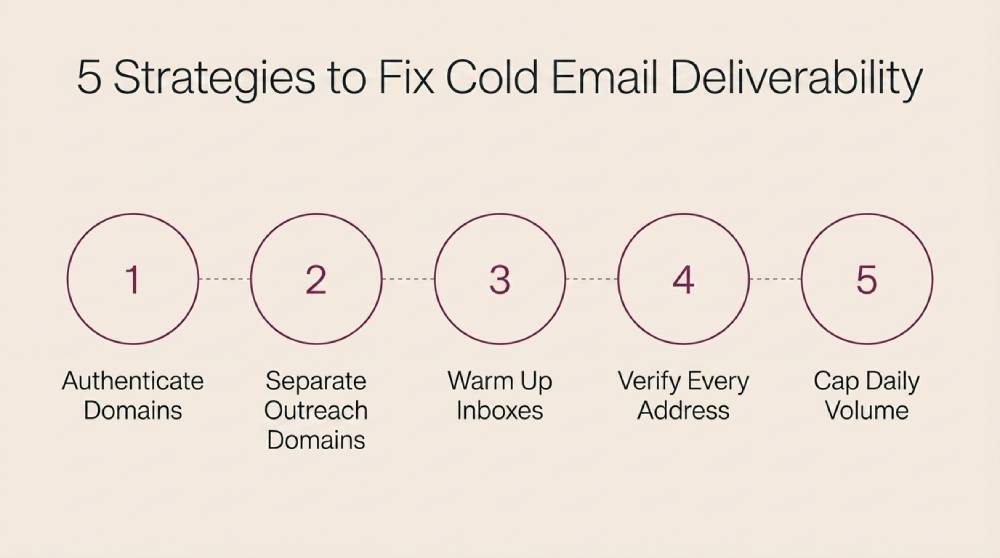
Every cold email deliverability problem from the section above has a fix. And most of the fixes are technical setup work that you do once and then maintain… not ongoing creative effort.
1. Set Up SPF, DKIM, and DMARC on Every Sending Domain
Authentication records are the price of admission. Without them, you are asking mail servers to trust emails from a domain that hasn't proven it is real.
Sender Policy Framework (SPF) tells receiving servers which sending IP addresses are allowed to send on your behalf. DomainKeys Identified Mail (DKIM) adds a cryptographic signature that proves the email wasn't tampered with in transit.
Domain Message Authentication Reporting and Conformance (DMARC) ties both together and tells the server what to do if either check fails. All these authentication protocols go into your domain's DNS settings, and they take about 20 minutes to configure per domain.
- Add an SPF record that explicitly lists every sending service – your cold email software plus any warmup tool you use
- Generate DKIM keys through your sending platform and publish the public key as a DNS TXT record on the domain
- Set your Domain-based Message Authentication policy to "quarantine" at minimum – this tells servers to flag unauthenticated emails instead of delivering them
- Verify all three records using a tool like MXToolbox after setup to confirm they are resolving correctly before you send anything
2. Use Separate Domains Exclusively for Cold Outreach
Your primary domain should NEVER be a part of a cold email sequence. If a cold campaign damages your reputation (and at some point, one will), you want that damage contained to a domain you can replace. Separate outreach domains act as a buffer. They take the reputation risk so your main domain doesn't have to.
- Register 2-3 outreach domains that are close variations of your primary brand domain – not random unrelated names
- Set up each outreach domain with its own Google Workspace or Microsoft 365 account and full authentication records
- Rotate sending across all outreach domains evenly so no single domain absorbs a disproportionate share of the volume
- Replace any outreach domain that starts showing declining inbox placement rather than trying to rehabilitate it
3. Warm Up Each Inbox for at Least Three Weeks Before Launching
A new inbox is a blank slate. No history, no reputation, no trust. If you start sending cold emails from it on day one, every mail provider treats those messages as suspicious by default. Warming up means sending a small number of real emails from the new inbox and gradually increasing over two to three weeks.
- Start each new inbox at 5 emails per day and increase by 3-5 emails every two days over a three-week ramp period
- Use a dedicated email warm-up tool that generates authentic-looking opens and replies to build positive sender reputation signals
- Monitor inbox placement throughout warmup. Don't start cold sequences until placement consistently exceeds 90% in the primary inbox
- Keep the warm-up tool running even after you start sending cold emails to maintain ongoing positive engagement signals on each inbox
This is the step where a lot of teams get impatient. They run a warm-up for a week, and when they see decent placement numbers, they launch their cold campaign early.
Then placement drops within a few days because the email reputation wasn't fully established. Three weeks feels long, but it is the difference between a campaign that starts strong and one that gets throttled by day five.
4. Verify Every Address Before It Enters a Sending Sequence
Your list is only as good as its last verification date. An address that was valid three months ago might bounce today because the person left the company or the domain shut down. Every bounce lowers your sender score, and a batch of bounces in a single send can crater it.
Verification tools check whether an email address is active and capable of receiving mail before you waste a send on it.
- Run every list through a verification service like ZeroBounce or NeverBounce before uploading it to your sending platform
- Remove catch-all domain addresses and role-based addresses like info@ or support@ – they inflate bounce rates and rarely convert
- Set a hard rule: any previously verified email addresses sitting unused for more than 60 days get re-verified before they touch a sequence
- Track your bounce rate per campaign and pull the sequence immediately if it crosses 2%. That is the threshold where reputation damage starts
If your cold email outreach links to landing pages – and most of it does – those pages need to work flawlessly every time a prospect clicks through. A broken form or a dead CTA on the landing page wastes the deliverability you spent weeks building.
Teams running Playwright tests on their outreach landing pages should look at TestDino’s Playwright reporting dashboard for tracking those test results in CI. It groups failures by root cause and flags flaky tests automatically.
This matters because a landing page test that passes on retry but fails intermittently is hiding a real UX issue your prospects are hitting. Open-source HTML reporters show you pass/fail, but TestDino shows you patterns across runs: which pages break most often, which failures are environment-specific, and which ones are actual bugs that need fixing.
5. Cap Daily Volume at 50 Emails Per Sending Address
Volume is where most teams get it wrong. They have a list of 5,000 prospects, and they want to reach all of them this week. So they push 200+ emails through a single inbox in one day. Gmail notices. Outlook notices. The emails start going to spam by midday, and the sender doesn't find out until the reply rate report comes back empty three days later.
- Set a hard cap of 50 sends per inbox per day – scale total volume by adding more inboxes rather than raising the cap
- Space sends at least 3-5 minutes apart throughout the workday, so the pattern looks like manual sending rather than automated blasts
- Avoid sending on weekends and outside business hours. Unusual sending windows flag automated behavior in inbox provider algorithms
- Monitor inbox placement weekly per sending address and reduce volume on any address where spam placement starts climbing above 5%
3 Business Scenarios That Show How Cold Email Deliverability Breaks (And How to Fix It)
Cold email deliverability problems don't come out of nowhere. They usually trace back to something specific about the business. Here are three different business types, the deliverability problem each one is prone to, and how that problem typically gets solved.
1. A TikTok Ad Account Provider: When Your Audience Has Heard Every Pitch Before
Take a company like Uproas’ TikTok agency ad accounts service. A business like this sells into a narrow, sophisticated audience – performance marketers and media buyers who get pitched constantly and have learned to ignore anything that reads like a template.
That is the kind of niche where a generic cold email problem shows up fast: a single sending domain, no warmup, and generic messaging. Send the same pitch to an affiliate running $1K/day and an agency running $50K/day, and neither group feels like the email was written for them. Open rates stay low, and the primary domain starts showing spam placement issues.
The fix in a scenario like this usually isn't about writing better subject lines. It is structural:
- Separate sending domains with full authentication
- A proper multi-week warmup period before any domain touches a cold sequence
- Segmentation by the one variable that actually changes the pitch – in this case, ad spend tier.
When the message matches the recipient's actual situation, complaint rates drop, and replies go up, because the email stops looking like a blast and starts looking like it was sent to one person.
2. A Business Formation Service: When List Size Matters More Than List Quality
Now consider a company like Start in Wyoming, which helps entrepreneurs form Wyoming LLCs. A business like this often has access to large, broad lists pulled from directories or purchased data sources. That volume is tempting, but it is also exactly where deliverability tends to break down.
The problem shows up when speed and reach get prioritized over verification. A purchased or aging list carries a mix of spam traps and people who were never actually forming a business in the first place. Bounce rates climb past acceptable thresholds, and a sending domain can end up blacklisted – sometimes more than once – before anyone traces it back to list hygiene.
The fix here is less about infrastructure and more about discipline: verifying any list within 48 hours of sending and building prospect lists from sources where the data reflects real, current intent rather than relying on purchased lists at all.
For a formation service specifically, the highest-value fix is targeting people who are actively in the process of starting a business, since that relevance does more for deliverability than any technical adjustment.
3. A High-Ticket eCommerce Brand: When Cold Email Looks Like a Blast Instead of a Note
Picture a product like IceCartel’s custom diamond chains that are sold in the $1,400–$2,500+ range. Most cold email advice assumes a B2B audience, but a high-ticket eCommerce brand with a narrow buyer pool, say, music industry professionals and content creators, can run into its own version of the same problem, just from the other direction.
The risk for a business like this is treating cold outreach like a promotional campaign instead of a personal note. High volume and no reference to the recipient as an individual will get flagged fast, both by spam filters and by the recipients themselves, who can tell the difference between a real message and a mass send.
The fix is low daily volume per inbox, full domain authentication, and messages that reference something specific and public about the recipient. When the volume stays low and the personalization is real, complaint rates stay near zero, and inbox placement holds up because the email reads as if it came from one person, not a system.
Conclusion
Cold email deliverability is the result of every decision you make about your sending infrastructure. So respect the systems behind email and think of cold email deliverability as something you maintain, not something you fix. When you build campaigns around that mindset, every email you write finally gets the opportunity to do the job it was meant to do.
We built Revnew to handle the full outbound pipeline for B2B teams. Our managed outreach runs on dedicated sending infrastructure with authentication built in from day one, so your team can focus on responding to replies instead of troubleshooting why nobody's seeing the emails.
If your current outreach is underperforming and you are not sure whether it is a deliverability problem or a targeting problem, we will audit both. Contact us now and see how it works.